S
Situation
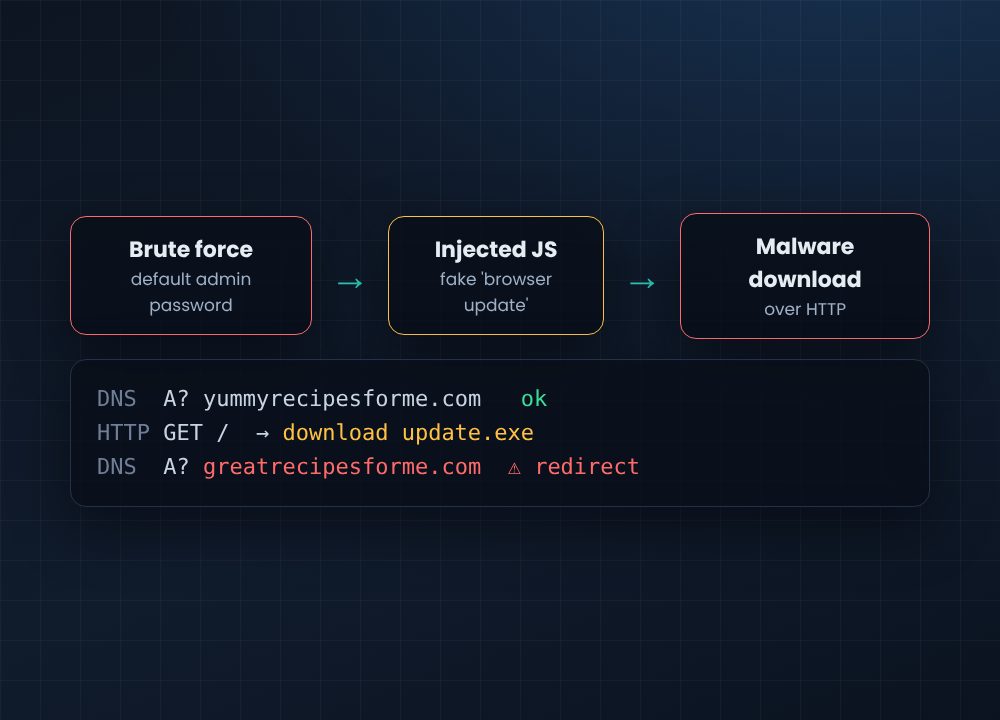
A former employee brute-forced the admin account of yummyrecipesforme.com, which still used a default password. They injected JavaScript that pushed visitors to download a fake browser update, which redirected them to a malicious copy of the site. Customers' computers began running slowly.
T
Task
Investigate the incident, identify the network protocols involved, document what happened and recommend a remediation for brute-force attacks.
A
Action
- Reproduced the attack safely in a sandbox while capturing traffic with tcpdump.
- Traced the chain through DNS and HTTP, from the legitimate site to the malware download to the redirect to the fake domain.
- Identified HTTP as the protocol that delivered the malware, and confirmed that DNS itself was working normally.
- Documented how the incident was detected, how it was investigated, its root cause and its impact.
R
Result
- Root cause: a default admin password and no limit on login attempts.
- Recommended removing default credentials, adding account lockout or rate limiting, enforcing MFA and alerting on admin logins. Also recommended offboarding procedures, a recovery plan, customer communication and HTTPS.
- Deliberately did not recommend forced password rotation, which current NIST guidance advises against.